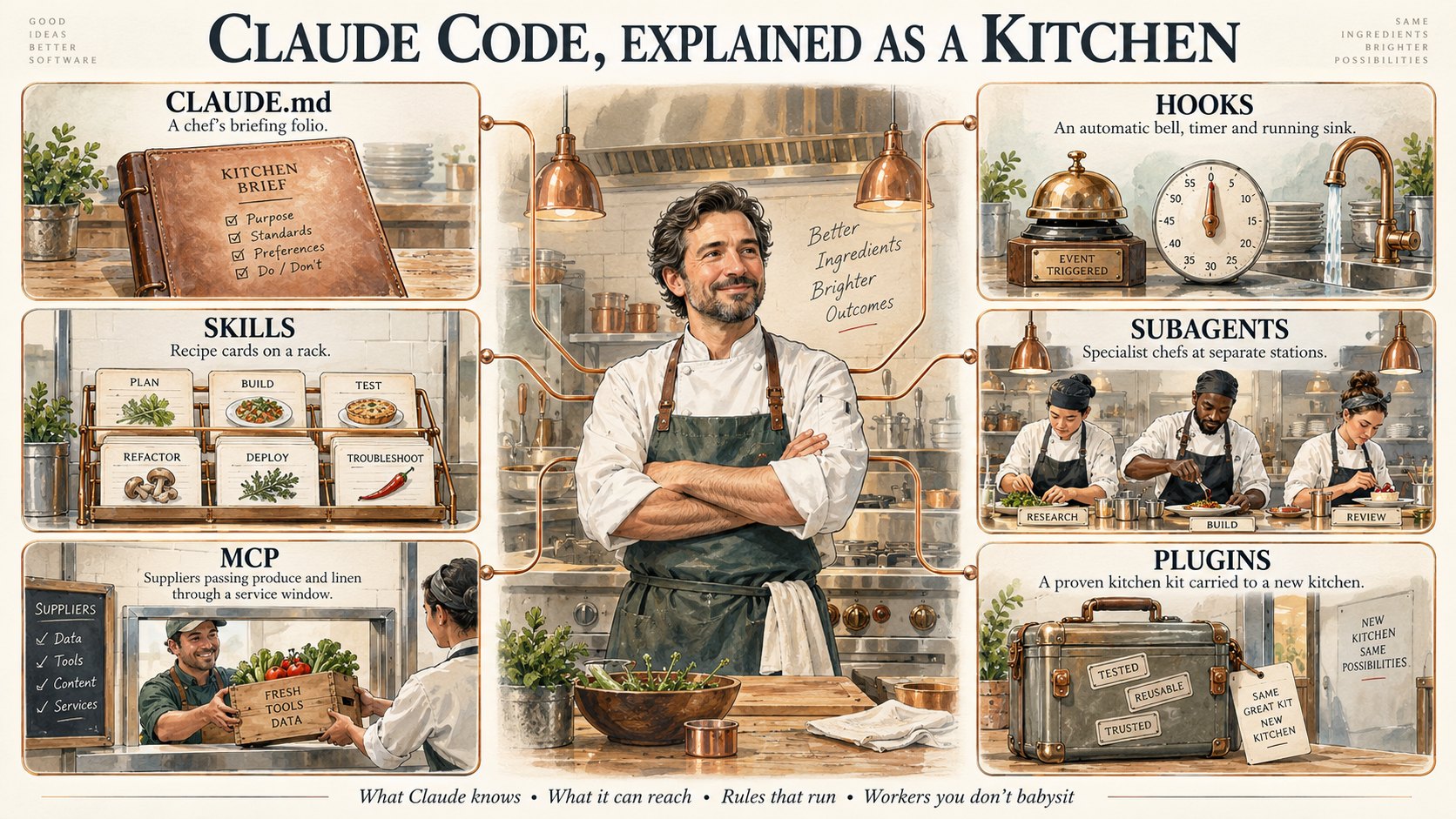
Six ideas, one kitchen
Think of Claude Code as a restaurant kitchen and Claude as the head chef. Every concept below is just one part of how a good kitchen runs. Tap any one to jump to it.
| Concept | In the kitchen | What it does for you |
|---|---|---|
| CLAUDE.md | The briefing before service | Gives Claude a memory of your whole project, every session |
| Skills | Recipe cards for dishes on repeat | Saved, reusable instructions Claude pulls out when needed |
| MCP | Suppliers: produce, linen, the POS system | Connects Claude to Gmail, Slack, databases and other tools |
| Hooks | "Wash hands before service" | Scripts that fire automatically at specific moments |
| Subagents | A pastry chef, a grill cook | Focused helpers that each work their own station |
| Plugins | A proven setup for a new kitchen | Package your setup so a new project starts ready to go |
What each one actually is
In the kitchen: before anyone touches a knife, the head chef gets a briefing. The menu, the standards, how this kitchen runs.
CLAUDE.md is a plain text file that lives in your project folder. Claude Code reads it automatically at the start of every session, so you never have to re-explain who you are, what the project is, or how you like things done.
Good things to put in it: what your business does, who your customers are, your tone of voice, rules you always want followed ("never send anything without asking me first"), and where important files live.
Use it for: anything that should be true every single time Claude works on this project.
In the kitchen: every kitchen has recipe cards for the dishes it makes on repeat. You're not explaining how to make the sauce every single service.
A skill is a saved, reusable set of instructions for one specific job, like writing your monthly client report, formatting a quote, or turning call notes into a follow-up email. Claude only pulls the recipe card out when that job comes up, so your CLAUDE.md stays short.
Use it for: any task you've explained to Claude more than twice.
In the kitchen: no kitchen produces everything in-house. You have suppliers: your produce guy, your linen service, your POS system.
MCP stands for Model Context Protocol. It's the standard way Claude connects to things outside your project folder: Gmail, Slack, Google Drive, your calendar, a database, your CRM. Each connection is one "supplier" Claude can order from.
Use it for: letting Claude read and work with the tools your business already runs on, instead of you copying and pasting between them.
In the kitchen: great kitchens don't rely on reminders. Wash hands before service. Check temps every hour. They just happen.
Hooks are small scripts that fire automatically at specific moments: before Claude edits a file, after it finishes a task, when a session starts. Claude doesn't need telling, and it can't forget.
That's the real difference from CLAUDE.md. An instruction in CLAUDE.md is a request Claude will usually follow. A hook is a rule that runs every time, no matter what.
Use it for: anything that must happen every time without fail, like a safety check, a backup, or a notification when a long job is done.
In the kitchen: big service? You bring in specialists. A pastry chef. A grill cook. Each focused, each working their own station.
A subagent is a specialist helper with its own instructions and its own working space. Claude hands it one focused job, like researching a topic, reviewing a draft, or checking numbers, and it reports back with the result. Because it works at its own station, the main conversation stays clean.
Use it for: jobs that need focus, or several jobs that can happen side by side.
In the kitchen: build a kitchen setup that works, package it up, and every new kitchen on your team starts with the same great setup instantly.
A plugin bundles the pieces you've built (skills, subagents, hooks, MCP connections and shortcut commands) into one package. Install it in a new project, or share it with your team, and everything arrives in one step.
Use it for: copying a setup that works to a new project, a new team member, or a new client, instead of rebuilding it from scratch.
Which one do you need?
Match the problem you actually have to the part of the kitchen that fixes it.
The easy part: you don't have to write any of these files yourself. Ask Claude Code in plain English to create a CLAUDE.md, write a skill, set up a hook, or make a subagent, and it builds the files for you. Knowing which one to ask for is the skill that matters.
Three prompts to set up your kitchen
Open Claude Code in your project folder and paste these in, one at a time.
Interview me, one question at a time, about my business: what we do, who our customers are, how we like to sound, and the rules you should always follow.

When we're done, write it all into a CLAUDE.md file in this folder. Keep it short and practical. Only include things that should be true every time you work here.
Every [week / month] I [describe the job step by step, as if explaining it to a new hire].

Turn this into a skill you can reuse whenever I ask for it. Show me the finished instructions in plain English before you save it.
I want a rule that runs automatically, every time, without relying on you to remember it: [describe the rule, e.g. "notify me when you finish a long task" or "never edit anything in my Finance folder"].

Set it up as a hook. Explain in plain English what it does and when it fires, and ask me before you save it.
Set up your kitchen in the right order
Write the briefing first
CLAUDE.md is the foundation. Everything else works better once Claude knows your business.
Save one recipe card
Pick the job you explain most often and turn it into a skill.
Connect one supplier
Start with the single tool you live in most: email, calendar or your documents.
Add one rule that just runs
Choose the one thing that must never be forgotten and make it a hook.
Bring in specialists, then package it
Once it's working, add subagents for focused jobs, and bundle the whole setup as a plugin when you want to reuse it.
- Does your project have a CLAUDE.md yet?
- Have you turned your most repeated task into a skill?
- Is Claude connected to at least one tool you use every day?
Common questions
Do I need to be technical to use any of this?
No. You can ask Claude Code in plain English to build every one of these for you. Understanding what each one is for matters far more than knowing how the files are written.
What's the difference between CLAUDE.md and a skill?
CLAUDE.md is read every single time, so keep it to what always applies. A skill only gets pulled in when its job comes up. Briefing versus recipe card.
Is MCP safe to connect to my email?
Connect only what you actually need, start with read access where you can, and keep a rule in your CLAUDE.md (or better, a hook) that Claude asks before sending or deleting anything.